Elevate Your Feed: A Designer's Look at Funscies Instagram Templates
In the relentless scroll of Instagram, standing out is less about shouting and more about speaking clearly with a distinct visual voice. Many of us have brilliant ideas—whether for a product launch, a personal brand, or a creative portfolio—but the execution in a fast-paced social media environment can feel daunting. This is where a well-crafted design asset transitions from a nice-to-have to a genuine workflow partner. Funscies Instagram Templates represent that kind of partner, offering a blend of modern aesthetic appeal and practical functionality designed for creators who value both style and efficiency.
Beyond Aesthetics: The Practical Anatomy of a Smart Template
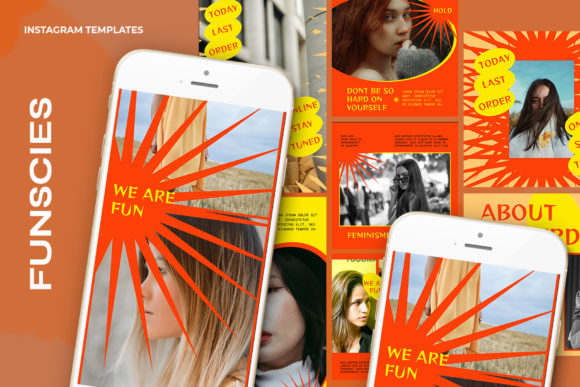
At its core, Funscies is more than just a collection of pretty layouts. It's a .PSD file built with a specific, user-centric philosophy. The standout feature is the Smart Object integration. For those unfamiliar, this is a non-destructive editing container within Adobe Photoshop. Instead of wrestling with clipping masks and resizing, you simply double-click the designated image layer, paste your own photo or graphic into the tab that opens, press Ctrl + S, and watch your content seamlessly adapt to the template's composition. This single feature drastically reduces production time and eliminates the guesswork from placement and scaling.
The technical specifications are thoughtfully chosen for versatility. A 300 dpi resolution ensures your graphics are crisp and professional, suitable not only for digital screens but also for high-quality print if you decide to repurpose a design for a brochure or poster. The RGB color mode is optimized for digital displays, guaranteeing vibrant color accuracy on phones and monitors. With two common social media sizes provided—1200 x 1200 px for the classic square post and 1920 x 1080 px for Stories, Reels, and video thumbnails—you have immediate coverage for Instagram's primary formats. Every text element is fully editable with the type tool, allowing you to input your own messaging, adjust fonts, and tailor the copy to your campaign's exact needs.
Where Style Meets Strategy: Ideal Applications for Funscies
The visual personality of Funscies leans into a clean, modern, and slightly playful aesthetic. It avoids overly trendy effects that might date quickly, instead favoring balanced compositions and ample white space that let your content breathe. This makes it an incredibly flexible foundation for a wide range of projects. Consider these practical scenarios where these templates can add immediate value:
- For Entrepreneurs & Small Business Owners: Launching a new product? Use the templates to create a cohesive series of announcement posts, behind-the-scenes Stories, and swipeable carousels. The professional polish helps build credibility and brand perception without requiring a dedicated design team.
- For Marketers & Content Creators: Streamline your monthly content calendar. Batch-create a week's worth of graphics in a single session. The consistent visual hierarchy across templates ensures your feed looks curated and intentional, which boosts audience recognition and engagement.
- For Bloggers & Publishers: Promote new articles, share quotes, or highlight key takeaways using visually engaging formats that stand out in a crowded feed. The templates can help establish a recognizable style for your editorial design on social media.
- For Designers & Crafters: Showcase your portfolio, client work, or handmade items with context. Place your designs within mockup-style layouts or create mood boards that tell a richer story than a standalone image.
It's important to note that the model imagery shown in previews is not included. This is actually a strength, as it encourages you to inject your own authentic visuals, making the final output uniquely yours. The template provides the structure; you provide the soul.
Integrating Funscies into Your Design Workflow
Adopting a new design asset should feel like an upgrade, not a complication. Here’s how to evaluate and integrate Funscies Instagram Templates effectively. First, consider your brand's existing visual language. Do you lean more towards minimalist sans serif fonts or elegant serifs? The templates are designed to be adaptable, but their inherent style should complement your core brand identity. Use the editable text fields to swap in your brand fonts and color palette to create a seamless look.
Think about visual hierarchy. The layouts are pre-structured to guide the viewer's eye—from headline to supporting image to call-to-action. Trust this structure. It’s based on common principles of effective communication and can actually improve the clarity of your message. When testing, create a sample post with your most common type of content. Does it feel right? Does it make your photo or graphic look better? That's the key test.
From a practical standpoint, the easy-to-use nature of the Smart Object system means you can train a team member or virtual assistant to produce on-brand graphics quickly. This consistency is invaluable for maintaining a professional presence across all your social media graphics. While these are digital-first assets, their high resolution opens the door for creative repurposing in web design hero images, email newsletter banners, or even packaging design mockups.
Ultimately, tools like Funscies Instagram Templates are about removing friction from the creative process. They provide a polished starting point that respects your time and amplifies your ideas. By focusing on practical application and seamless integration into your existing workflow, you can leverage this asset to produce more consistent, engaging, and professional content that resonates with your audience and strengthens your visual footprint.