60 Autumn Instagram Story Templates for Canva
There’s a particular warmth to autumn content—the way golden hour light catches on falling leaves, the cozy texture of a knitted sweater, the rich palette of burgundy, burnt orange, and deep forest green. If you’ve ever tried to capture that feeling in your Instagram Stories, you know it takes more than just a nice photo. It requires a cohesive visual language that feels intentional and inviting. That’s precisely where a well-curated set of templates becomes invaluable, saving you hours of design work while ensuring your seasonal content looks polished and professional.
A Visual Toolkit for the Season
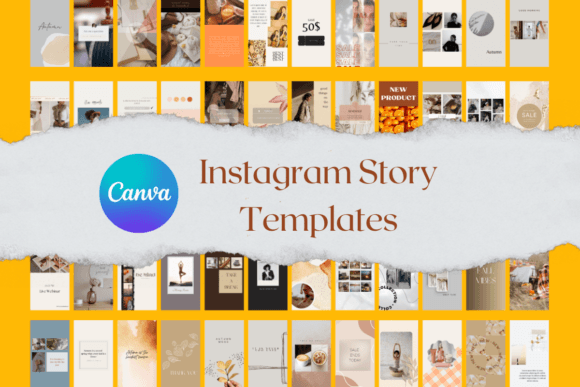
The 60 Autumn Instagram Story Templates for Canva are designed to embody the essence of the season. Think of them as a ready-made visual toolkit. The aesthetic leans into soft, natural textures—think linen backdrops, subtle grain, and organic shapes—paired with a color story that feels both warm and sophisticated. You’ll find layouts that range from minimalist, with ample negative space for a single striking image, to more dynamic compositions perfect for sharing a recipe, a quote, or a behind-the-scenes glimpse. The personality is approachable and elegant, avoiding overly kitschy fall tropes in favor of a more refined, editorial feel.
What makes this collection particularly useful is its versatility. As a designer or marketer, you know that consistency is key to brand recognition. These templates provide a structured yet flexible framework. You can use them to announce a seasonal sale, share a blog post update, promote a new product, or simply engage your audience with a relatable autumn moment. The visual hierarchy is already built in, guiding the viewer’s eye from the headline to the supporting image or text, which directly impacts how your message is received and remembered.
Practical Applications Beyond Instagram
While they’re optimized for Instagram Stories, the utility of these design assets extends further. Because they are fully customizable in Canva, you can adapt them for a variety of projects. A small business owner might use them to create cohesive social media graphics that align with their existing brand identity. A blogger could repurpose a story template into a Pinterest pin or a newsletter header. The underlying design principles—clean layouts, balanced typography, and harmonious color palettes—translate well across digital platforms.
The real value here is in the time saved and the consistency gained. Instead of starting from a blank canvas each time you want to post, you have a library of professional layouts at your fingertips. This allows you to focus on what really matters: your message and your connection with your audience. The templates act as a creative springboard, helping you maintain a regular posting schedule without the design fatigue that often comes with it.
Choosing and Customizing Your Templates
When integrating any set of design assets into your workflow, a bit of strategy goes a long way. First, consider your existing brand palette. While the autumn templates come with a curated color scheme, Canva’s editing tools make it simple to swap out hues to match your own brand colors. This is a crucial step for maintaining brand recognition. Don’t just use the templates as-is; make them yours.
Next, think about font pairing. The templates likely include a mix of modern typography—a clean sans serif for body text and perhaps a more expressive serif or script font for headlines. Look at how these typefaces interact. A strong font pairing creates visual interest and improves readability. If the included fonts don’t quite fit your brand voice, you can easily change them in Canva. Just remember to keep hierarchy in mind: your headline should grab attention, while supporting text should be easy to read at a glance.
Finally, test the templates with your actual content. Load in a photo from your recent shoot, type in a caption you’d actually use, and see how it feels. Does the layout support your message? Does the visual style align with the overall personality of your brand? The goal is for the template to feel like a natural extension of your brand identity, not a foreign element. With 60 variations to choose from, you have the flexibility to find the perfect fit for different types of stories—from announcements and promotions to inspirational quotes and interactive polls.
Elevating Your Seasonal Strategy
Autumn is a season rich with marketing opportunities, from back-to-school and harvest themes to the lead-up to the holiday season. Having a robust set of creative tools like these Instagram story templates allows you to tap into that seasonal energy with professionalism and flair. It’s about working smarter, not harder. By leveraging pre-designed, customizable layouts, you ensure that your content is not only beautiful but also strategic, helping to build audience engagement and reinforce your brand’s visual presence during a key time of year.
Ultimately, the best design assets are the ones that empower your creativity rather than constrain it. A thoughtfully designed template collection does just that—it handles the heavy lifting of layout and composition, freeing you up to infuse each piece with your unique voice and perspective. Whether you’re a seasoned designer looking for a quick starting point or a business owner wearing many hats, this kind of resource can be a genuine game-changer for your social media workflow.